We use our own cookie and analytics tools to understand how people find and use Calorize. If you came from a Google ad, we tell Google when you sign up or buy, to measure that ad. There are no ads inside the app. Your choice is remembered for a year.
You can cancel your subscription at any time — your card will not be charged again on the next billing cycle.
Via web (Premium / Max through Monobank)
- Open your profile.
- Expand the Calorize Premium or Max card — it shows the “Valid until” date and how many days are left.
- At the bottom of the card, tap “Disable auto-renewal”.
Automatic billing will stop. Your current paid period stays active — you can keep using all plan features until the “Valid until” date. Partial refunds for the used period are not provided.
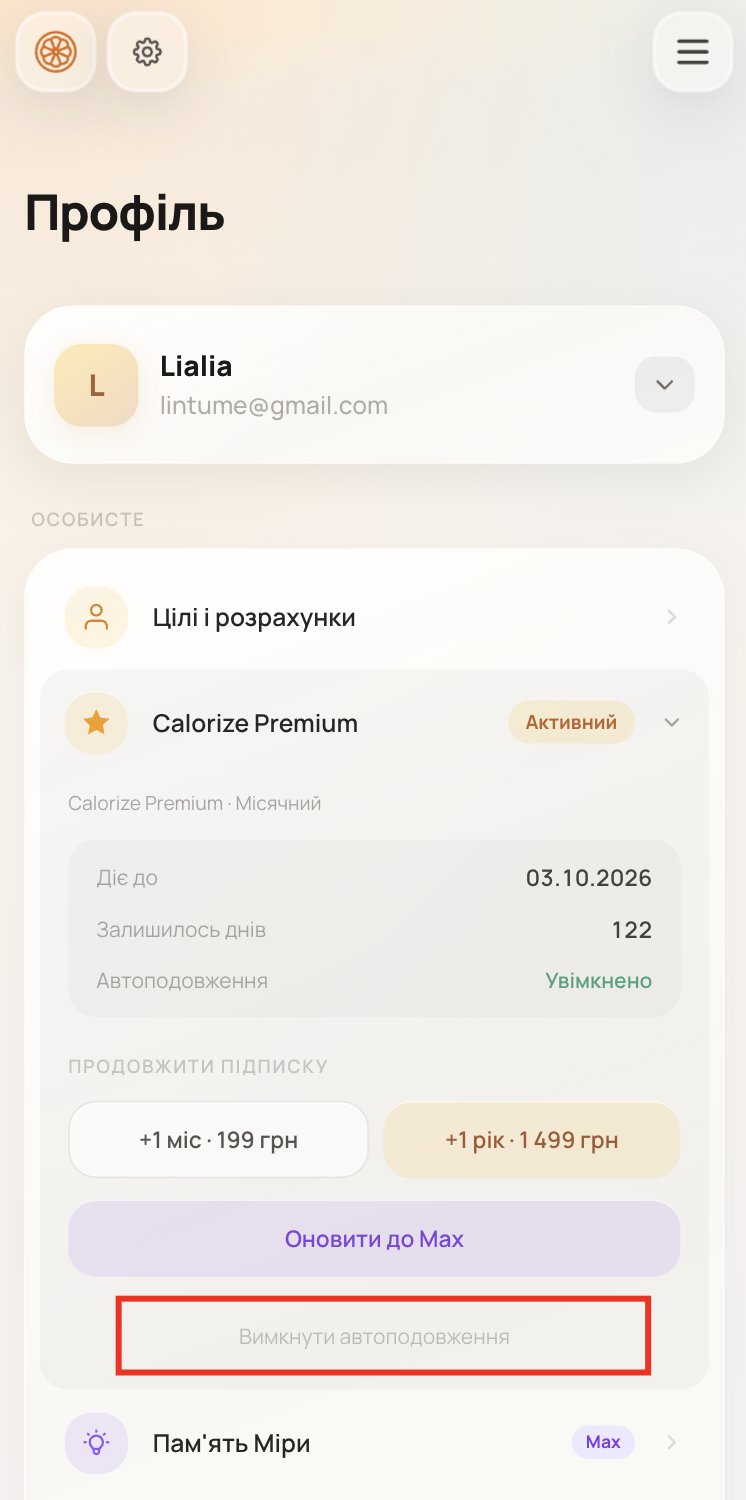
If a renewal payment did not go through. When the bank declines the charge (for example, not enough money on the card), the subscription ends but the card stays saved, and we try to charge it again over the next few days — at most three attempts in total. During that time the profile card says “Payment failed”: expand it and tap “Disable auto-renewal” to remove the card and stop the attempts.
Via the App Store (if you paid on iPhone)
If you paid for the subscription inside the iOS app — via Apple Pay / App Store — you can cancel it only in iPhone Settings:
- Settings → your name at the top → Subscriptions.
- Find Calorize in the list.
- Tap “Cancel Subscription”.
This is an Apple restriction — Calorize cannot cancel App Store subscriptions from its own server.
Via Google Play (if you paid on Android)
If you subscribed inside the Android app — via Google Play — you can cancel it only in Google Play:
- Open the Google Play app.
- Tap your profile icon (top right) → Payments & subscriptions → Subscriptions.
- Find Calorize in the list.
- Tap “Cancel subscription” and confirm.
Or in a browser: play.google.com/store/account/subscriptions.
This is a Google restriction — Calorize cannot cancel Google Play subscriptions from its own server.
Pause instead of cancelling (Google Play only)
On the same Google Play screen you can pause the subscription for one to three months instead of cancelling it. The pause starts when your current paid period ends. While it lasts you are not charged and the paid features are switched off; when it ends, the subscription resumes and renews on its own.
During a pause, the subscription card in your profile says Paused and shows the date it resumes, with a button that opens Google Play — you can resume early at any time and access comes back immediately.
What happens after cancellation
- Until the paid period ends — all plan features remain active.
- After it ends — you automatically move to the free plan.
- Your diary, products, and measurements are kept. You can delete them separately by deleting your account.
Where you bought it decides where you manage it
Calorize is sold in three separate places, and a subscription can only be managed where it was bought:
| Where you paid | Where you manage it |
|---|---|
| calorize.ai (card) | Your profile on the website, in a browser |
| iPhone app (App Store) | iPhone Settings → Apple ID → Subscriptions |
| Android app (Google Play) | Google Play → Payments & subscriptions |
This is not our preference: Apple and Google do not let outside services cancel their subscriptions, and we cannot cancel what Apple charges.
The device you are holding does not matter. If you subscribed on the website and now use the iPhone app, it is still managed on the website. The app shows a note saying so.
The reminder before a charge
A few days before your card is charged automatically, we send a reminder — an email and an in-app notification. It names the exact amount, the plan and the charge date, and links to this page and to your profile so there is time to switch auto-renewal off.
The reminder covers web subscriptions only (card payments through Monobank). For App Store and Google Play subscriptions, Apple and Google send their own notice.
If you would rather not get it, you can switch it off in notification settings — the "Billing" section, "Upcoming charge". The failed-payment email cannot be switched off: it is about money that did not go through.
Why the purchase buttons are unavailable in the app
If your subscription is active but was bought somewhere else, the purchase buttons are disabled and replaced by an explanation.
That is deliberate: had the purchase gone through, you would be running two subscriptions at once — say a card charge from the website plus a charge from Apple. Each one separate, neither aware of the other.
If you want a different plan:
- Change it where the current subscription lives. A website subscription can be moved from Premium to Max on the website, and the time you already paid for is credited.
- Or wait until the current period ends and subscribe wherever suits you. Access stays fully available until then.
Time you have paid for is never lost: even if a subscription from another place takes over, the longer paid period stays yours.